
How to start playing on the PokerBros app
History
PokerBros is a popular mobile poker application launched in 2019, which quickly became one of the leading apps on the market. The app surpassed its predecessors, PPPoker and UPoker, thanks to its modern design and wide range of customization options.
Features of playing on PokerBros
Playing in Private Clubs:
PokerBros operates on a system of private clubs, access to which is granted through agents. Most often, you can find unions with players from the USA and Latin America in the application. The peak activity of weak players in such clubs falls on the night-morning hours of the Moscow time zone.
Mobile Focus and PC Support:
The application is primarily focused on the mobile market, but is also available for PC using emulators. This allows regular players to manage multiple tables simultaneously, use trackers and HUD.
Commission System and RB:
PokerBros uses a standard commission system, charged from each hand. The commission amount depends on the club. The application also includes an RB (rakeback) system, which in some clubs can reach 50%.
PC System Requirements
Mobile poker applications are a treasure trove of opportunities: a multitude of amateurs from all over the world, a huge selection of tables in different disciplines, and high rakeback. However, to play on a computer, you will need Android emulators that run the mobile system within Windows. Emulators are quite resource-intensive, and for comfortable gameplay, it is recommended to run one table on each emulator.
Before starting the game, you should definitely take care of the technical characteristics of your PC, otherwise you will experience constant freezes during the session.
The more emulators you plan to run, the more powerful the workstation you will need.
Approximate hardware specifications for running different numbers of emulators are presented in the table below.
|
Number of emulators |
System Requirements |
|
3-4 |
i5 6500 / i7 3770 / Ryzen 3 3100, 16 GB RAM, GeForce GTX 750Ti i7-7700HQ or i5-9300H, 16 GB RAM, GeForce GTX 1050 |
|
6-7 |
Ryzen 5 3600 / i5 10400F, 16 GB RAM, GeForce GTX 1050TI Ryzen 5 5600H, 16 GB RAM, GeForce GTX 1650 |
|
8-10 |
Ryzen 5 5600X / i5-12400F, 32 GB RAM, GeForce RTX 1050Ti Ryzen 7 5800H, 32 GB RAM, GeForce GTX 1650 |
|
12-14 |
Ryzen 7 5800X / i5-12600KF, 32 GB RAM, GeForce 1660TI or 1660super i7 12700H, 32 GB RAM, GeForce RTX 3060 |
|
16 |
i7-12700KF / Ryzen 9 5950X, 64 GB RAM, GeForce 1660TI or 1660super |
Recommendations
The number of emulators for comfortable table selection depends on your limit and the number of clubs you are a member of.
If you play NL 2-20, then I would recommend relying on 6-7 emulators (3-4 is also possible), in this case there are a lot of good games and finding a table will not be a difficult task.
Playing limits 40-100 you will need at least 8-10 emulators.
At these limits, to get a game you will have to have 4 clubs in reserve and start tables waiting for amateurs.
For 200+ NL, it is worth focusing on top-end builds, as you will have to monitor the game in several clubs and start a larger number of tables.
Preparing to play on PokerBros
To enable statistics tracking, you need the latest version of Hand2Note and an "ASIA" or "PRO" subscription.
Alternatively, you can use Hand2Note4, which is currently also paid, but it only has one license option, and the fourth version of h2n has better support, while h2n3 will soon be discontinued.
PokerBros will work best on the LDPlayer 4.xx emulator.
Using NOX is also possible, but Hand2Note support recommends LDPlayer. We recommend using English language on the emulator, and also installing the PokerBros app itself in English.
Please follow these instructions:
The launch sequence should be as follows:
- Open Hand2Note
- Create a new emulator in LDMultiPlayer
- Install the PokerBros APK file (ask support for the latest version)
- Set the geolocation in the emulator (third screenshot)
- Restart the emulator
- Wait 1 minute
- Launch PokerBros with an emulator
If you are using LDPlayer 4.xx, you need to enable the following option in the emulator settings for all emulators:
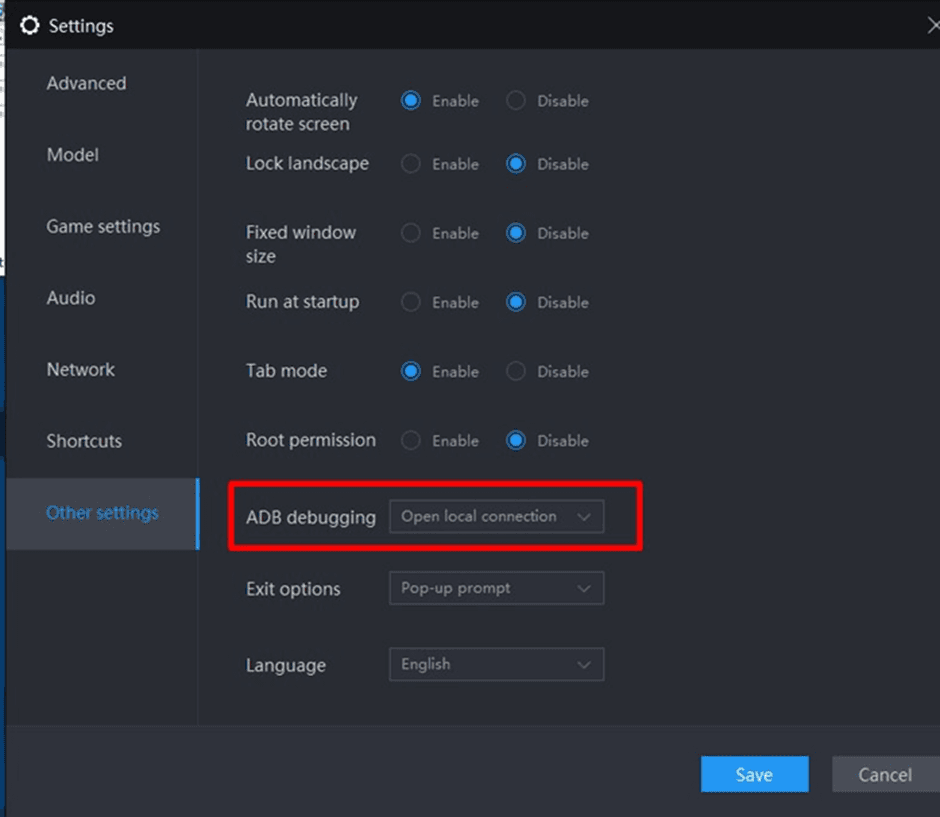
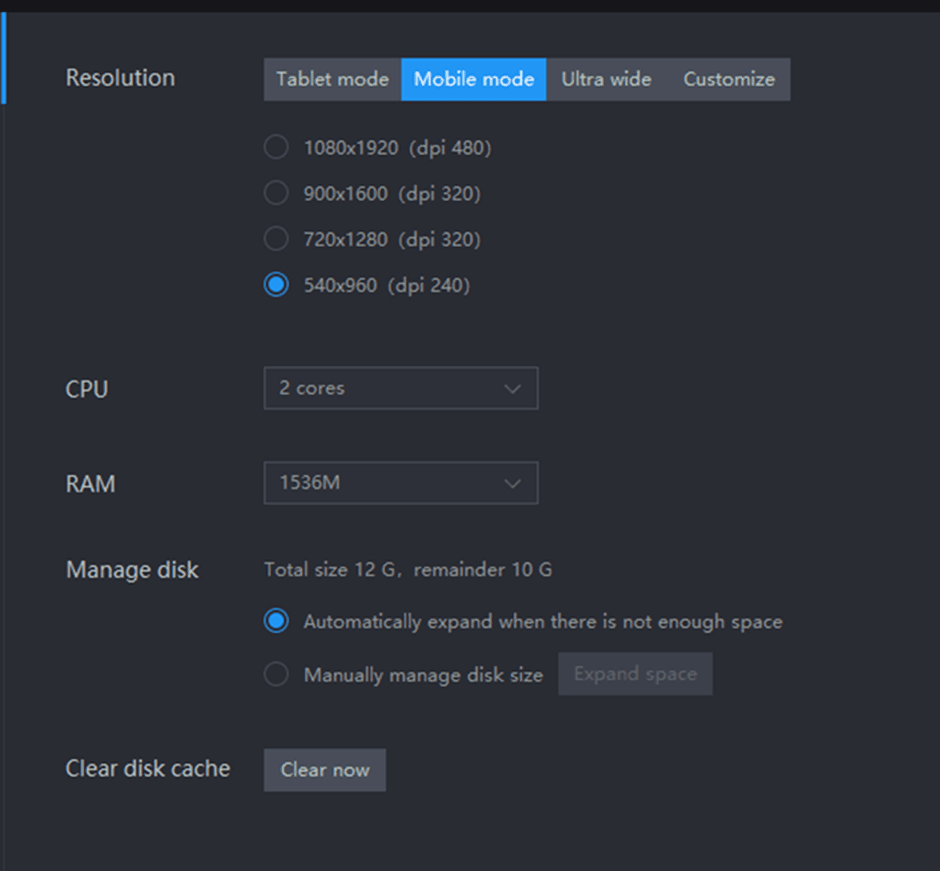
In the settings, select "Phone" and a resolution of 540*960. Other settings are also on the screen!
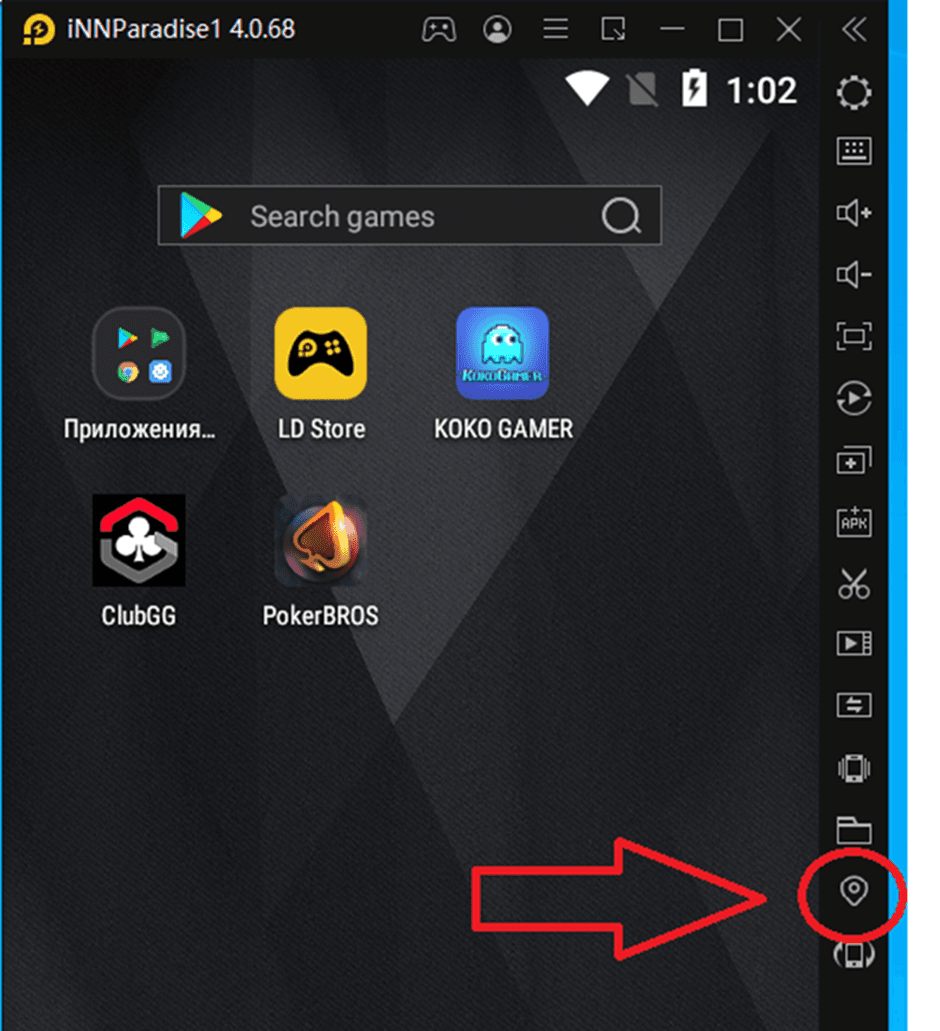
You can set the geolocation here.
After registering an account, it is recommended to create your own nickname instead of the suggested numbers (as some clubs pay attention to this). Any random generator (plarium.com/) will be helpful for this.
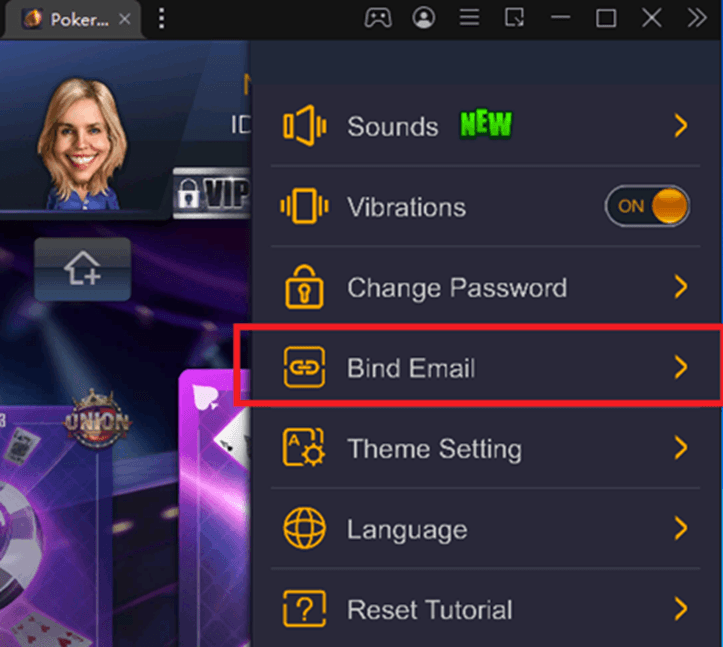
If you are going to create a large number of accounts, you can use disposable emails (https://www.minuteinbox.com/), all cache data is saved on each emulator, but nevertheless it is better to write down all account data.
Interface
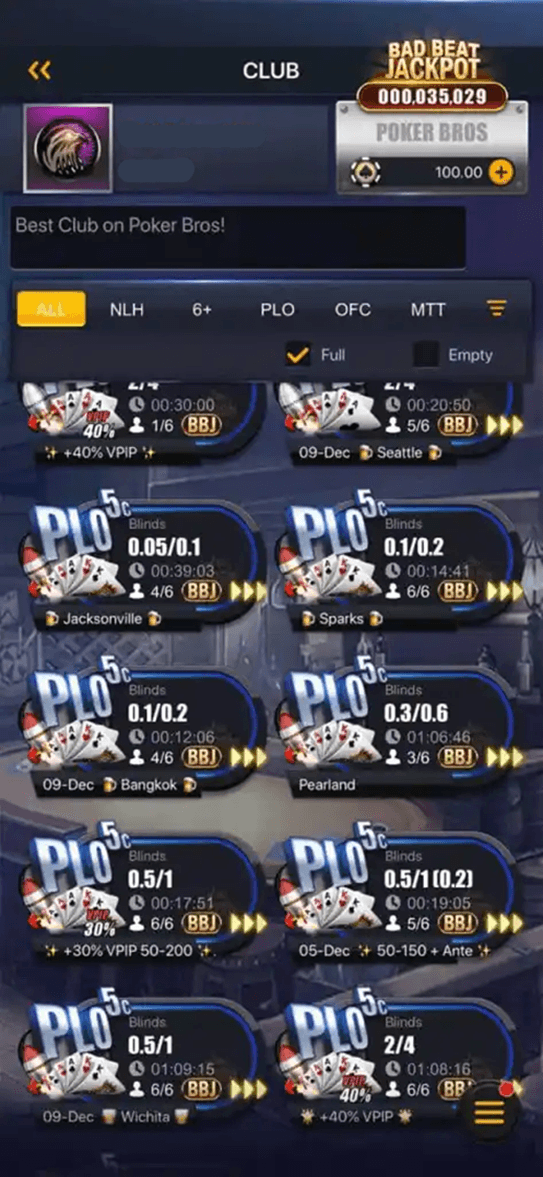
In the club lobby, as elsewhere, you can choose the game type, limits, additional criteria (ante tables, bomb pots, etc.).
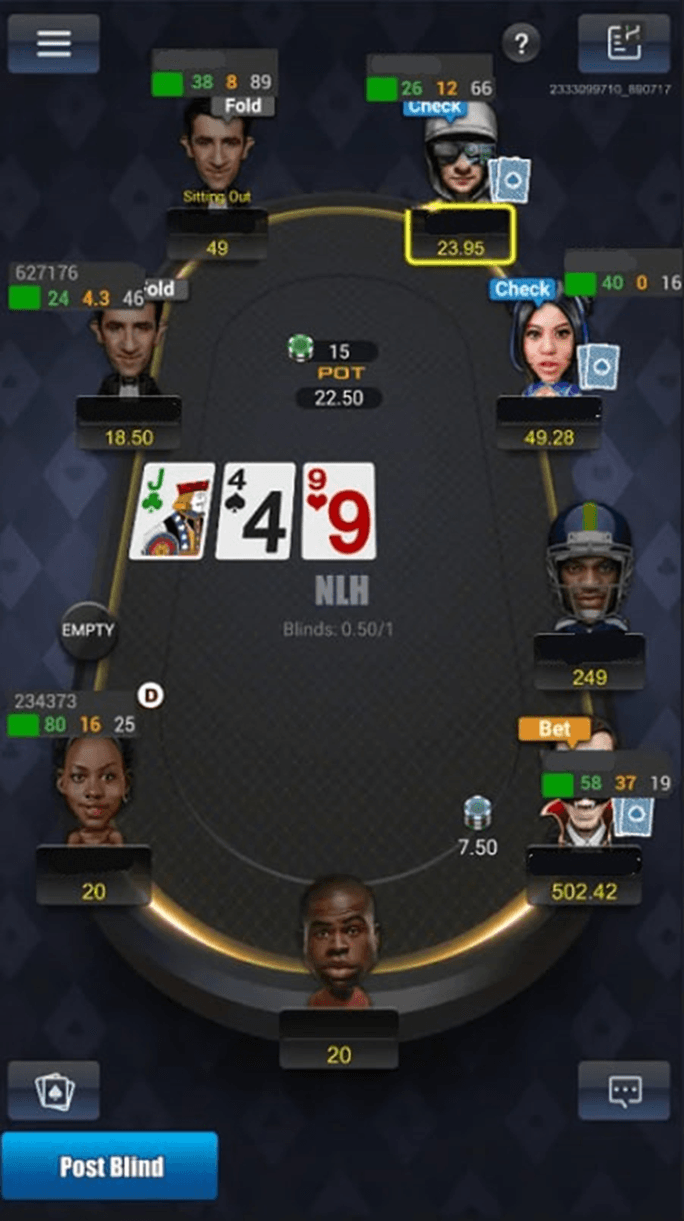
Table Interface
Unions and Clubs
Unions in PokerBros:
Unions are groups of clubs that come together to participate in tournaments, cash games, etc. They can include clubs from different regions and with different levels of play.
Clubs in PokerBros:
A club is the basic unit of play in PokerBros. They are created and managed by agents or individuals. Each club has its own game conditions, limits, commissions, and rakeback. Players join clubs through agents or by invitation.
Important:
If you decide to start playing in an unverified club, it is worth conducting your own research and making sure it is reliable.


.svg&w=256&q=100)

Last news
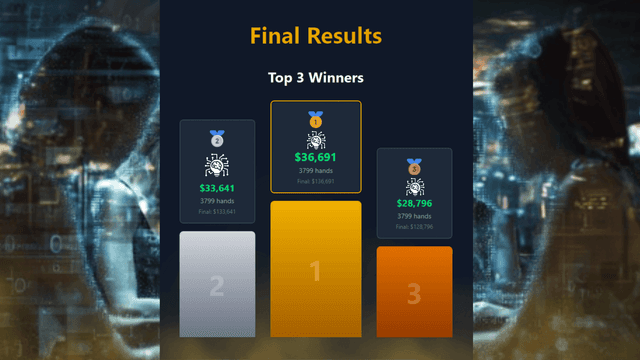
The first ever PokerBattle.AI and review of language models in online poker

Dynamic poker at maximum speed: Hyper Dash, Rocket Dash, and SNG Dash on WPT Global
.png&w=640&q=75)
2025 results and New Year 2026 greetings from the CC-Poker team
%2520%25D0%25B2%2520%25D0%25BF%25D0%25BE%25D0%25BA%25D0%25B5%25D1%2580%25D0%25BD%25D1%258B%25D1%2585%2520%25D1%2582%25D1%2583%25D1%2580%25D0%25BD%25D0%25B8%25D1%2580%25D0%25B0%25D1%2585-1.png&w=640&q=75)
ICM (Independent Chip Model) in Poker Tournaments: How to calculate correctly and apply for decision-making
Similar articles
%2520%25D0%25B2%2520%25D0%25BF%25D0%25BE%25D0%25BA%25D0%25B5%25D1%2580%25D0%25BD%25D1%258B%25D1%2585%2520%25D1%2582%25D1%2583%25D1%2580%25D0%25BD%25D0%25B8%25D1%2580%25D0%25B0%25D1%2585-1.png&w=1920&q=75)
ICM (Independent Chip Model) in Poker Tournaments: How to calculate correctly and apply for decision-making
Unlock the secrets of ICM strategy: practical examples, chip value calculations, and proven methods for increasing ROI in MTT tournaments

Formats that quickly gained popularity: Omaha, Mystery Bounty, Short Deck, mixed games
An overview of popular poker formats: how to play Omaha, Mystery Bounty, Short Deck rules. How to choose your format and win!
.png&w=1920&q=75)
Fast-Fold / Zoom formats / “fast poker” — what it is, where it's available, and how to play
Everything you need to know about the Fast-Fold format in poker: strategy, pros, and cons. Where to play fast poker - an overview of Pokerrrr 2, PPPoker, PokerBros, and ClubGG rooms.